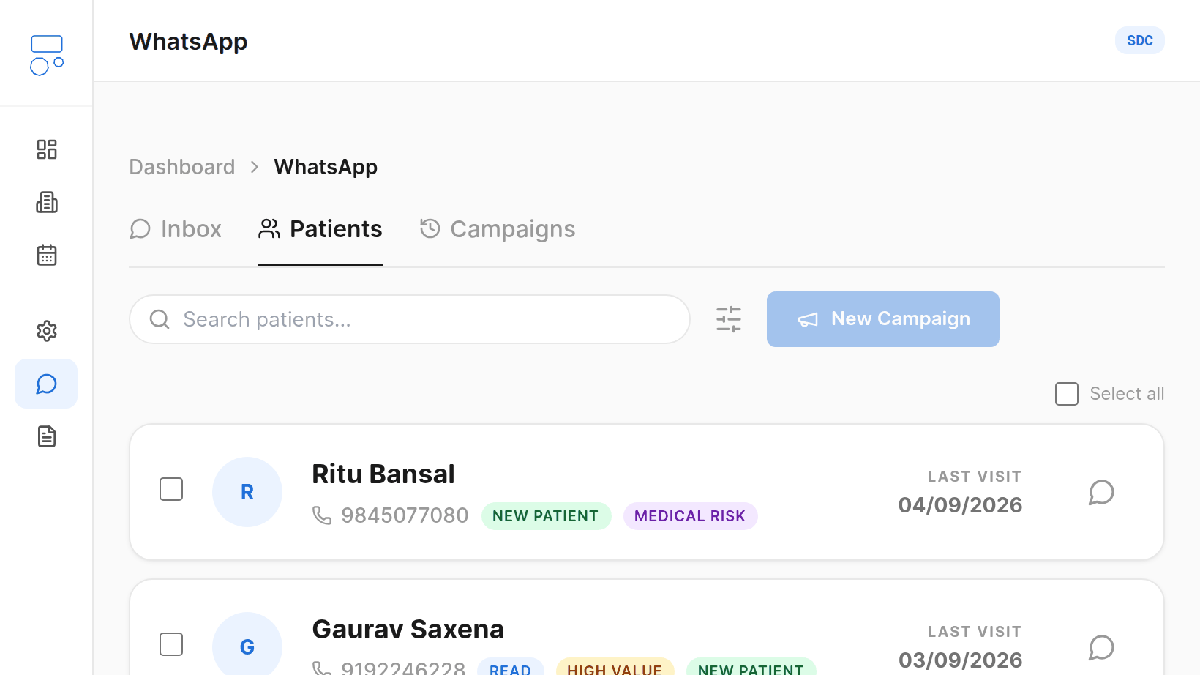
Screenshot of Dentomate, using a demonstration clinic. No real patient data appears here.
This is the mechanical version: what to click, in what order, and what each plan lets you do. If you want the thinking behind who to contact and what to say first, read the patient recall guide, then come back.
From the dashboard, open WhatsApp in the sidebar. There are three tabs: Inbox for conversations, Patients for the segmented list, and Campaigns for what you have already sent. Start on Patients.
Every patient row carries tags that Dentomate works out from the visit history. You do not build a filter or maintain a list.
For a first campaign, use Due for Visit. It is the warmest group and it will give you a realistic read on your wording before you spend the bigger, colder list on a message you have not tested.
Two ways, and the difference matters:
Either way, read the names before you send. A campaign is not something you can recall after the fact.
Click New Campaign. You give it two things:
That second one is the part that surprises people. WhatsApp does not let a business start a conversation with free text. Every message you initiate has to use a template Meta approved in advance, which is why you pick from a list rather than typing. The upside is that approved templates do not land in spam.
Templates carry placeholders that Dentomate fills per recipient, in this order: the patient's first name, your clinic's name, and your clinic's contact number. So a template reading "Hi {{1}}, this is {{2}}. Your last check-up was a while ago, reply here or call {{3}} to book." arrives as a message addressed to that person, from your clinic, with your number in it.
Nothing else is substituted. If a template implies a specific treatment or a specific date, it will say the same thing to everyone on the list, so pick a template whose claims are true for the whole group.
Sending happens immediately, one message per patient. Patients without a valid mobile number are skipped. Indian numbers entered as ten digits are handled correctly.
Then stop and let it run. Do not send a second campaign the same afternoon because the first one was quiet. WhatsApp is a personal channel and two messages in a day from a clinic reads as spam to the patient and to Meta.
The Campaigns tab shows what went out and the per-recipient delivery status: sent, delivered, read. Useful for spotting dead numbers, useless as a measure of success.
The number that matters is in the Inbox tab. Replies arrive there attached to the patient's record, so whoever is at the desk can answer, and the conversation stays with the clinic instead of on one person's phone. When a patient replies, you are inside WhatsApp's 24-hour service window and can answer in normal free text without a template.
| Plan | Recall campaigns | Price |
|---|---|---|
| Free | Not included | ₹0 |
| Starter | 2 every 30 days | ₹399/mo |
| Pro | Unlimited | ₹799/mo |
Annual billing works out to ₹3,990/yr for Starter and ₹7,990/yr for Pro. Full breakdown on the pricing page.
The Starter limit is a rolling window, not a calendar month. Two campaigns sent on the 28th and 29th free up again on the 28th and 29th of the next month, not on the 1st.
Fifteen minutes is genuinely enough for the first one. The part that takes longer is deciding what your message should say, which is a clinical and commercial question rather than a software one.
Start on the free plan, add your patients, and see the segments before you decide whether to upgrade.